
Partnership Overview
A Partnership in Ananas GDS is a data-sharing agreement between an Accommodation account and a Tour Operator account. When an active partnership contract exists between two companies, the accommodation’s published fact sheets and availability calendar become accessible to the tour operator via API — and the tour operator can send structured data back if the contract terms allow it.
Partnerships are only possible between an Accommodation and a Tour Operator. Two accommodations or two operators cannot form a data-sharing contract with each other at this stage of the platform.
Please note: The Ananas GDS contract is an in-app data-sharing agreement only, not a legally binding contract under any jurisdiction. Ananas GDS does not act as a mediator or hold any legal responsibility between the two parties.
The Marketplace
The Marketplace is the directory of all companies registered on Ananas GDS. You can browse, filter, view profiles, and initiate partnership contracts from here.
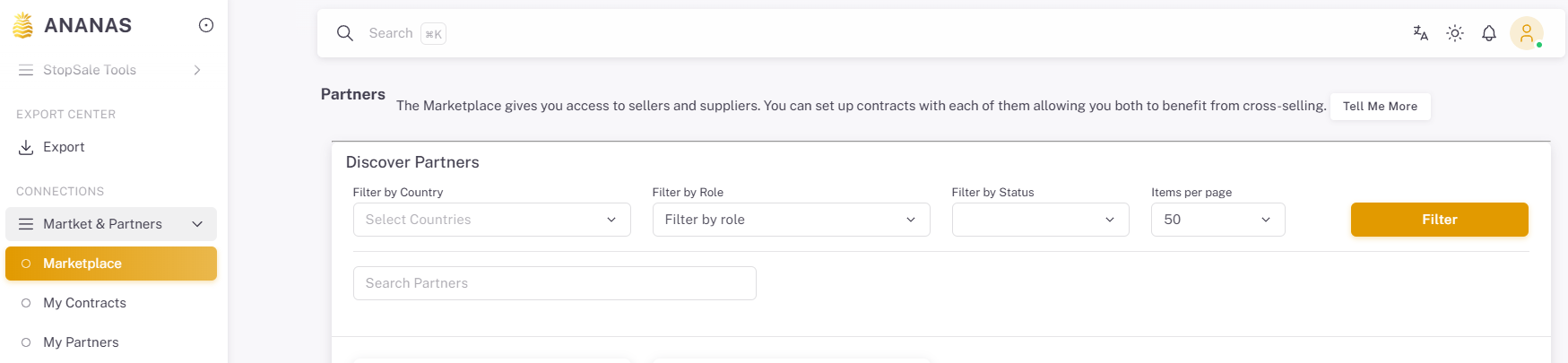
Accessing the Marketplace
Navigate to Market & Partners → Marketplace in the sidebar. All registered companies load in the listing. By default you will see companies of the opposite type — if you are an Accommodation, you will primarily see Tour Operators, and vice versa. You can still view same-type companies for reference, but cannot initiate contracts with them.
Filtering the Marketplace
Use the filter panel to narrow results by:
- Company type (Accommodation / Tour Operator)
- Country of operation
- Company name (keyword search)
Company Profile
Click any company card to open a profile popup showing company name and type, country, website, brief description, and number of properties (for accommodation accounts). From here you can click View Full Profile for more detail, or Make A Contract to proceed directly to the contract creation form.
Keep your own company profile complete — logo, description, address, and website. Companies with full profiles receive more partnership requests because they appear more credible and searchable in the Marketplace.
Sending a Contract
- Find the company in the Marketplace
Use filters or search to locate the tour operator (or accommodation) you want to partner with. - Click their card and select “Make A Contract”
This opens the contract creation form. - Select the properties to include
For accommodation accounts: choose which of your properties the contract covers. A contract can cover one or multiple properties. - Define the contract terms
Set start date, end date, data access permissions, and any override options. See Contract Terms Reference below. - Send the contract
The other party receives a notification and can view the contract under their Contracts tab. The contract status becomes Pending.
Receiving & Responding to a Contract
When another company sends you a contract, you will receive an in-app notification. To respond:
- Go to Market & Partners → Contracts.
- Find the pending contract and click View.
- Review all terms carefully.
- Choose one of the following actions:
Action |
Effect |
|---|---|
| Accept | Contract becomes active. Data access begins immediately according to the contract terms. |
| Reject | Contract is rejected. The sending party is notified. No data access is granted. The contract remains visible in history as rejected. |
| Edit | You propose changes to the terms. The contract reverts to Pending status for the original sender to review. |
Editing a Contract
Either party can propose edits to a contract at any time.
- Before acceptance: Edit the contract — it stays Pending for the other party to review.
- After acceptance: Propose edits — the existing contract remains active until the other party accepts the new version. Data flow is not interrupted during the amendment period.
Each edit creates a new contract version. A full version history is visible within the contract view.
Cancelling a Contract
- Go to Market & Partners → Contracts.
- Find the active contract and click View.
- Click Cancel Contract.
Important: Cancellation is not immediate. The contract does not terminate at the moment of cancellation — it remains active until the end date specified in the contract terms, at which point API access is fully revoked. Both parties are notified of the cancellation request. This grace period is intentional to give both sides time to adjust their systems and workflows.